How do you schedule a meeting with multiple busy people?
The tools available today make this problem manageable. Apps like Doodle, Arrangr, Calendly, and FrontDeskChat are built specifically for coordinating group schedules.
The top features go beyond just allowing group calls. They sync with calendars, show analytics on a dashboard, and make it easy to find a time that works across a large group.
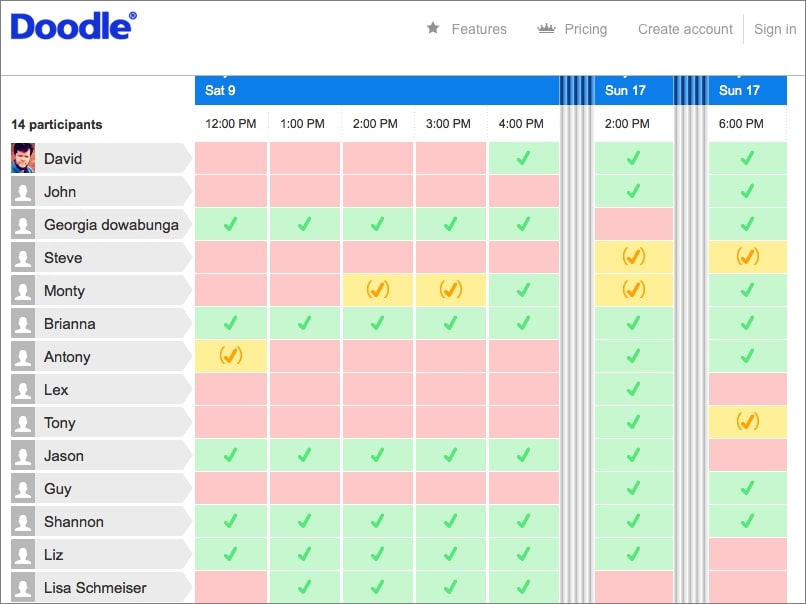
One particularly useful approach for group scheduling is the voting poll. You propose a set of available time slots and share a link. Attendees vote on which times work for them. Each person can see what others have selected, which helps everyone adjust around the most popular options.
Once the group agrees on a time, the app locks it in. The schedule syncs to your calendar automatically, and an email goes to all participants with a link to join the meeting.
Why this approach works
Scheduling apps with integrated video conferencing are popular across businesses of all sizes because they cut the time and cost of coordination. A meeting that once required days of email back-and-forth can now be settled in a few hours with a single polling link.
The combination of calendar syncing and meeting integration means you set up a time once, and the app handles invites, reminders, and the meeting link automatically.
Frequently asked questions about Schedule Group Meeting
How do you schedule a meeting with multiple busy people?
Use a scheduling app with calendar syncing or voting polls. FrontDeskChat and Calendly sync calendars to find overlapping free time automatically. Doodle lets you propose 3-4 time options and collect votes without requiring calendar access.
What is a voting poll in a scheduling app?
A voting poll lets you propose several time options and share a link. Attendees click the link and mark which times work for them. The app tallies the votes and shows you the most popular slot. You confirm it and invites go out.
Can attendees see each other's availability in a scheduling poll?
Yes in some tools. Apps like Doodle and Vyte let participants see each other’s selections as they fill them in, which makes it easier for the group to coordinate around the most popular options.
What happens once the group agrees on a meeting time?
The scheduling app confirms the time, syncs it to your calendar, and sends an email invitation with the meeting link to all participants. Most apps also send reminders before the meeting.
How many people can these scheduling tools handle?
Most tools handle groups of any size. Doodle and Vyte work well for 5-50 people. FrontDeskChat scales from 2-person bookings to large multi-staff scheduling. Google Calendar’s ‘Find a time’ feature works well for internal teams up to around 20 people.
What's the fastest way to schedule a group meeting?
For teams with shared calendars, Google Calendar’s ‘Find a time’ feature takes about 2 minutes. For external groups or people who don’t share calendars, a Doodle poll sent with a same-day deadline usually resolves within a few hours.