How to add observance days in Google Calendar?
Observance days include cultural celebrations, religious holidays beyond the major ones, and international awareness days. Adding them to your calendar helps you recognize dates that matter to your clients, team, or community.
Types of observance calendars available:
Google Calendar’s Browse Calendars section includes: international observances (Diwali, Lunar New Year, Cinco de Mayo), religious holidays (Hindu, Muslim, Sikh, Buddhist, Christian observances), regional observances, awareness days (International Women’s Day, Mental Health Day), and seasonal events.
How to add observance days:
Open Google Calendar and click the Settings gear icon in the top right corner.
In the left sidebar, click Add calendar and select Browse calendars of interest.
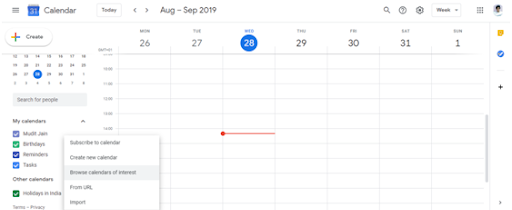
Browse the categories. You’ll see sections like Holidays, Observances, Religious holidays, and more. Click any section to expand it and see specific calendars.
Check the boxes for any observance calendars you want to add (for example: Observances: Diwali, Holidays: Hindu, Observances: International, or Awareness: Mental Health Day).
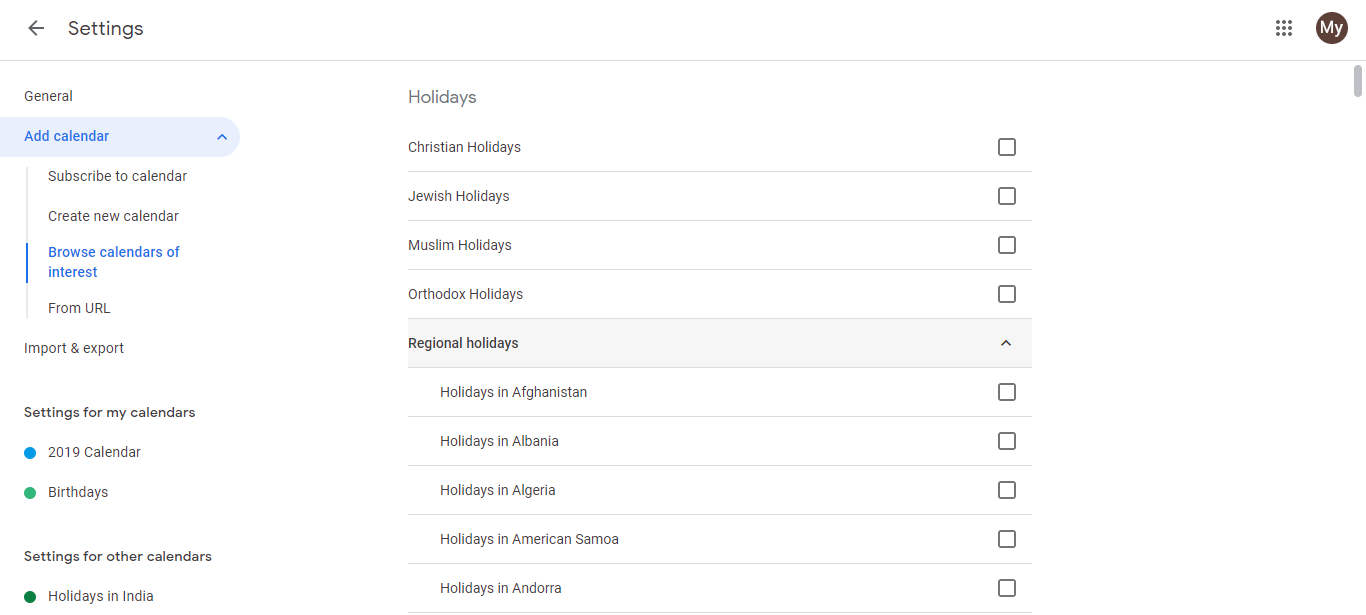
Each selected calendar appears in your Other calendars section. The dates sync automatically.
Click the eye icon next to a calendar to hide or show it. Click the three-dot menu to customize its color or turn notifications on/off.
Why add observance calendars:
When you have clients or team members from different cultures or backgrounds, observance calendars help you remember important dates without having to maintain a manual list. You can also set reminders so you don’t miss significant days.