How to add Kerala holidays into a Google calendar?
If you’re based in Kerala or serve clients there, adding Kerala holidays to Google Calendar helps you respect local observances and plan your availability around important dates.
What’s in the India holiday calendar:
Google Calendar’s India holiday feed covers national public holidays observed across India. However, Kerala-specific festivals and observances (like Onam, Vishu, Pooram, and temple festivals) may or may not be included depending on what Google currently maintains in their feed.
How to add India holidays:
Open Google Calendar and click the Settings gear icon in the top right corner.
In the left sidebar, click Add calendar and select Browse calendars of interest.
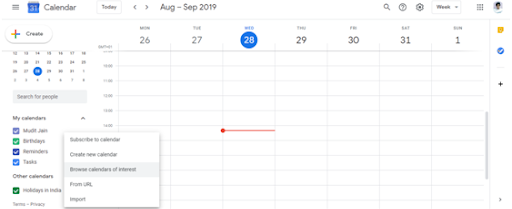
Search for “India” or scroll to find Holidays: India.
Check the checkbox to add the India holidays calendar to your calendar.
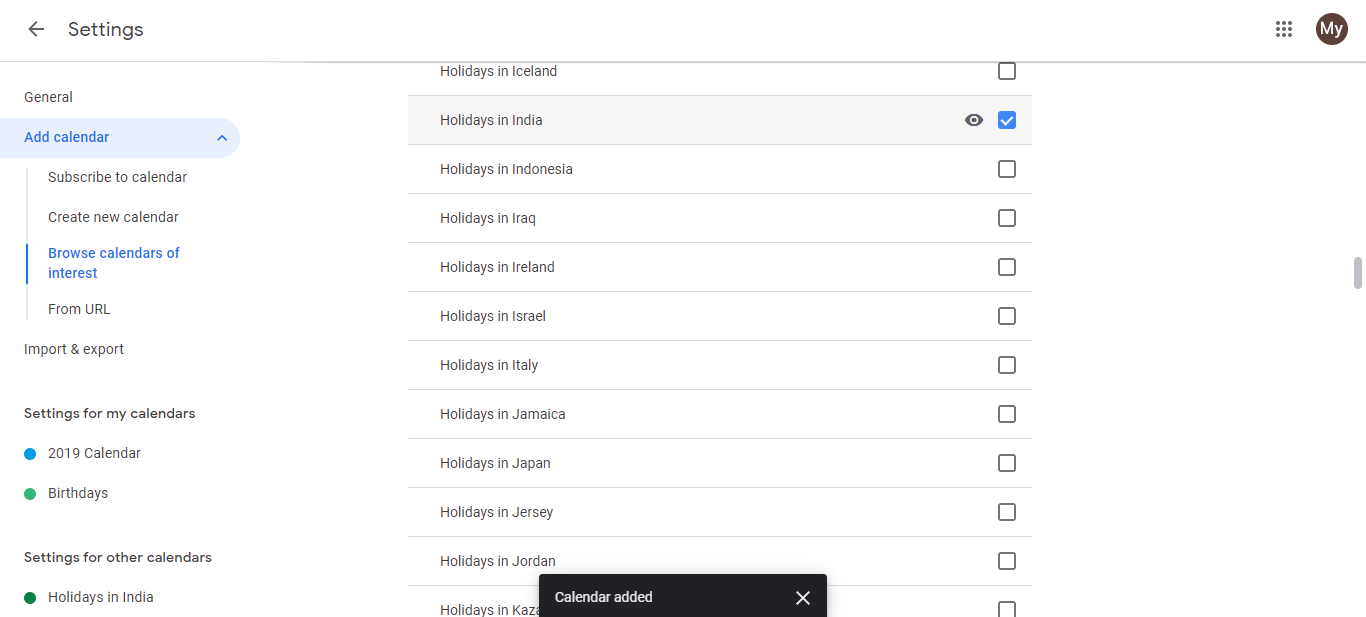
The India holidays calendar appears in your Other calendars section. National holidays and available regional observances will display on your calendar.
Click the eye icon next to the calendar name to hide or show it anytime.
Add missing Kerala holidays manually:
If a specific Kerala holiday doesn’t appear in the India calendar (for example, Onam or Vishu), you can add it manually as a recurring annual event.
- Go to the date of the holiday in Google Calendar.
- Click Create and enter the holiday name (e.g., “Onam”).
- Click More options.
- Set the date and time (all-day event works best).
- Under Repeat, select Every year.
- Click Save.
This ensures you don’t miss important Kerala observances. Google Calendar will remind you each year on that date.