How to add Jewish holidays to my Google Calendar?
Jewish holidays follow the Hebrew calendar, which is lunar-based. This means their Gregorian calendar dates shift each year. Adding them to Google Calendar means you’ll always have the correct dates, and Google Calendar updates them automatically year to year.
Major Jewish holidays that appear:
Rosh Hashanah (Jewish New Year), Yom Kippur (Day of Atonement), Sukkot (Feast of Booths), Shemini Atzeret (Eighth Day of Assembly), Simchat Torah (Rejoicing in the Law), Hanukkah (Festival of Lights), Purim (Festival of Lots), Passover (Pesach), and Shavuot (Weeks).
How to add Jewish holidays:
Open Google Calendar and click the Settings gear icon in the top right corner.
In the left sidebar, click Add calendar and select Browse calendars of interest.
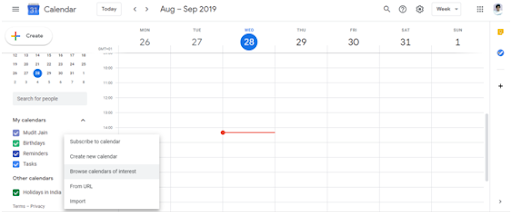
Search for “Jewish holidays” or scroll to find Holidays: Jewish.
Check the checkbox to add the Jewish holidays calendar to your calendar. It will appear in your Other calendars section.
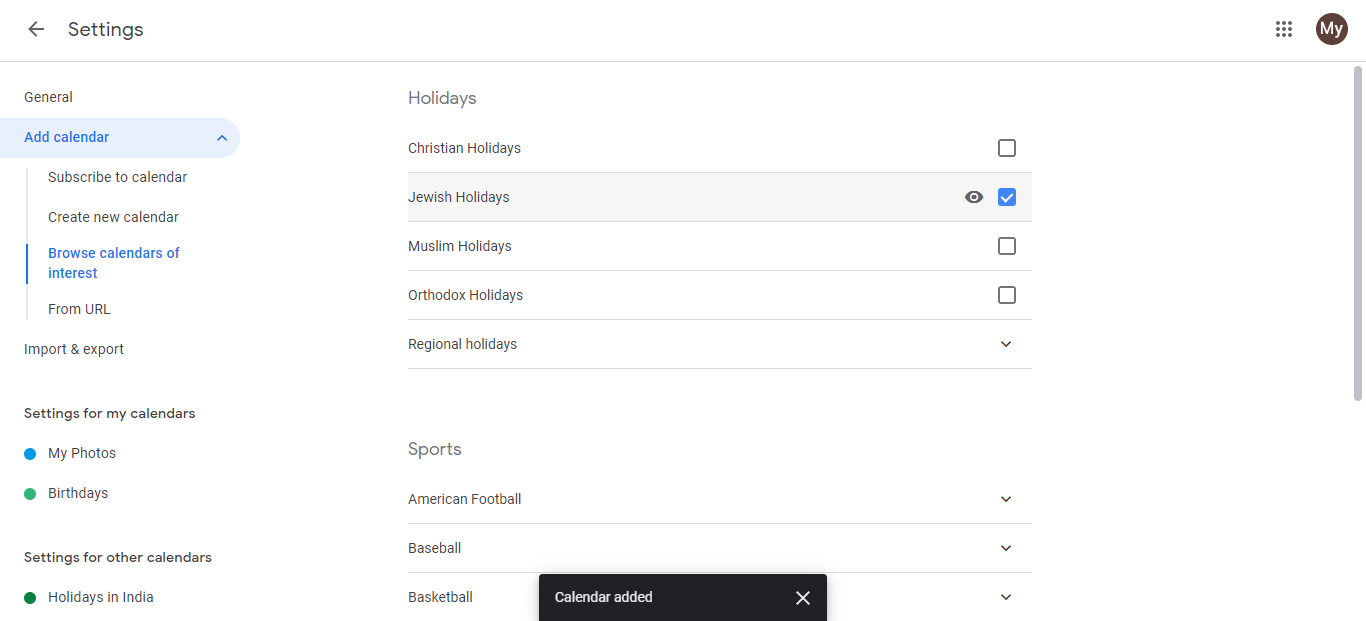
All major Jewish holidays will now display on your calendar, with dates automatically adjusted for each year based on the Hebrew calendar.
Click the eye icon next to the calendar name to hide or show it anytime.
Important: Observance times
Jewish holidays begin at sundown on the date listed, not at midnight. For example, if Rosh Hashanah falls on September 22 in the Gregorian calendar, it actually begins the evening of September 21. Google Calendar shows these as all-day events, so if you need exact observance times, check a Hebrew calendar reference.